6.6.3. Interactive visualization of propagation of light in Jupyter notebook
Matplotlib present useful visualization tools for showing the intensity profiles at a distance z in an interactive fashion in jupyter notebooks. Here, we show how to use it.
In the first place, we well determine the intensity distribution XZ for an object.
[1]:
from diffractio import degrees, mm, plt, um, np
from diffractio.scalar_sources_X import Scalar_source_X
from diffractio.scalar_masks_XZ import Scalar_mask_XZ

from ipywidgets import interactive
[2]:
# Initial parameters
x0 = np.linspace(-1050 * um, 1050 * um, 1024 * 2)
z0 = np.linspace(-0.125 * um, 4 * mm, 1024 * 4)
wavelength = 0.6238 * um * 10
[3]:
# Definition of source
u0 = Scalar_source_X(x=x0, wavelength=wavelength)
u0.gauss_beam(A=1, x0=0 * um, z0=0 * um, w0=2000 * um, theta=0 * degrees)
[4]:
# insert cylinder
u1 = Scalar_mask_XZ(x=x0, z=z0, wavelength=wavelength, n_background=1)

u1.cylinder(r0=(0, 1.25 * mm), radius=(1 * mm, 1 * mm), refractive_index=1.33, angle=0)
u1.draw_refractive_index(scale="scaled", colorbar_kind="horizontal")

[5]:
# loading the incident field in the simulation
u1.incident_field(u0)
[6]:
# WPM propagation
u1.WPM(verbose=False)
[7]:
# simple drawing
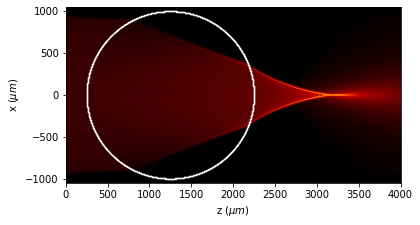
u1.draw(logarithm=True, scale="scaled", draw_borders=True)
[8]:
u1.draw_profiles_interactive()

6.6.4. Directly with interactive
[9]:
%matplotlib widget
[10]:
Imax = u1.intensity().max()
print(Imax)
75.72461367055705
[11]:
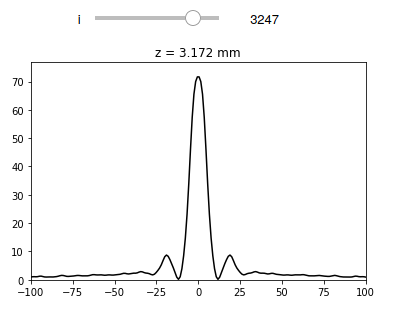
def __interact2__(i):
    plt.plot(u1.x, u1.intensity().transpose()[i], "k")
    plt.title("z = {:2.3f} mm".format(u1.z[i] / 1000))
    plt.ylim(0, Imax)
    plt.xlim(-100 * um, 100 * um)
[12]:
interactive(__interact2__, i=(0, len(u1.z) - 1, 1))
plt.show()
[15]:
%matplotlib inline