10.10. DXF at XY
DXF can be loaded in XY frame. This can be performed in different ways:
Loading data from x, y parameters
Loading data from a variable
Loading size from the .dxf file
In the 2. and 3. cases, number of pixels are required.
[1]:
from diffractio import np, plt
from diffractio import um, mm, degrees

from diffractio.scalar_masks_XY import Scalar_mask_XY
10.10.1. Loading data from x, y parameters
[2]:
x = np.linspace(-.5*mm, .5*mm, 1024)
y = np.linspace(-.5*mm, .5*mm, 512)
wavelength = 0.6328*um

filename_dxf = 'hatch_polyline.dxf'


t0 = Scalar_mask_XY(x, y, wavelength)
print(t0)
Scalar_mask_XY
 - x:  (1024,),   y:  (512,),   u:  (512, 1024)
 - xmin:       -500.00 um,  xmax:      500.00 um,  Dx:   0.98 um
 - ymin:       -500.00 um,  ymax:      500.00 um,  Dy:   1.96 um
 - Imin:       0.00,     Imax:      0.00
 - phase_min:  0.00 deg, phase_max: 0.00 deg
 - wavelength: 0.63 um
 - date:       2024-04-02_20_00_17
10.10.1.1. Equal size
[3]:
x = np.linspace(-.5*mm, .5*mm, 512)
y = np.linspace(-.5*mm, .5*mm, 512)
wavelength = 0.6328*um

filename_dxf = 'hatch_polyline.dxf'


t0 = Scalar_mask_XY(x, y, wavelength)
t0.dxf(filename_dxf, num_pixels=None, extent=None, units='um', invert=False,
       verbose=False)
t0.draw(scale='scaled')
<Figure size 512x512 with 0 Axes>

[4]:
t1 = t0.RS(z=5*mm, verbose=True)
t1.draw()
Good result: factor 1.63

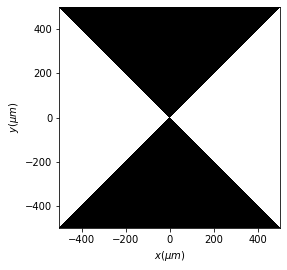
10.10.1.2. Invert image can also be performed
[9]:
x = np.linspace(-.5*mm, .5*mm, 512)
y = np.linspace(-.5*mm, .5*mm, 512)
wavelength = 0.6328*um

filename_dxf = './hatch_polyline.dxf'


t0 = Scalar_mask_XY(x, y, wavelength)
t0.dxf(filename_dxf, num_pixels=None, extent=None, units='um', invert=True,
       verbose=False)
t0.draw(scale='scaled')
<Figure size 512x512 with 0 Axes>
10.10.1.3. Different size
[6]:
x = np.linspace(-1*mm, 1*mm, 1024)
y = np.linspace(-.5*mm, .5*mm, 512)
wavelength = 0.6328*um

t0 = Scalar_mask_XY(x, y, wavelength)
t0.dxf(filename_dxf, num_pixels=None, extent=None, units='um', invert=False,
       verbose=False)

t0.draw(scale='scaled')
Scalar_mask_XY
 - x:  (1024,),   y:  (512,),   u:  (512, 1024)
 - xmin:       -1000.00 um,  xmax:      1000.00 um,  Dx:   1.96 um
 - ymin:       -500.00 um,  ymax:      500.00 um,  Dy:   1.96 um
 - Imin:       0.00,     Imax:      1.00
 - phase_min:  0.00 deg, phase_max: 0.00 deg
 - wavelength: 0.63 um
 - date:       2024-04-02_20_00_20
<Figure size 1024x512 with 0 Axes>

10.10.2. Loading data from a variable
[7]:
t0 = Scalar_mask_XY(x=None,y=None, wavelength=wavelength)
t0.dxf(filename_dxf, num_pixels=(1024, 512), extent=(-1000*um, 1000*um, -500*um, 500*um),
                units = 'um', invert = False,  verbose=False)

t0.draw(scale='scaled')
<Figure size 1024x512 with 0 Axes>

10.10.3. Loading data from .dxf size
num_pixels is always required.
[8]:
t0 = Scalar_mask_XY(x=None,y=None, wavelength=wavelength)
t0.dxf(filename_dxf, num_pixels=(512,512), extent=None,
                units = 'um', invert = False, verbose=False)

t0.draw()
<Figure size 512x512 with 0 Axes>